• apple,  bytedance,  facebook,  privacy,  tencent

    The Fight Over Asking Permission

    In a recent article posted on ArsTechnica.com titled “TikTok wants to keep tracking iPhone users with state-backed workaround”, I got the feeling that we tech nerds are going to be in for another Apple vs Developer showdown.

    Last summer, you may recall that things got a little dicey for the iPhone maker with the Hey blow up just before last year’s WWDC developers conference. The situation between Apple and Basecamp, the developer of the subscription-based Hey email service, generated backlash from the iOS developer community as well as attracting unwanted attention from U.S. law makers.

    The Ars Technica piece reports on the China Advertising Association’s efforts to develop a method for working around Apple’s new iOS and iPadOS 14 feature that requires developers to ask permission before tracking users across third-party developer apps and third-party websites with trackers built in. According to Apple, the App Tracking Transparency framework is mandatory “if your app collects data about end users and shares it with other companies for purposes of tracking across apps and web sites”.

    That’s it. That’s the whole thing. Apple wants app developers to ask for iPhone and iPad user’s permission before slurping up as much user data as possible. The sad reality is that many people will simply allow the tracking just to dismiss the message and get to their social media apps. The path of least resistance often wins.

    The one passage that caused me to raise an eyebrow was the quote from an Apple spokesperson:

    “The App Store terms and guidelines apply equally to all developers around the world, including Apple,” the company said. “We believe strongly that users should be asked for their permission before being tracked. Apps that are found to disregard the user’s choice will be rejected.”

    During last year’s congressional hearings about the power held by “big tech”, I recall Apple CEO Tim Cook saying that all developers are held to the same App Store standards. Apple included. Most of the time that is true, but we all know, in business, there is plenty of wiggle room for deals between large companies. In my opinion, the App Store Small Business Program and the reduction of the commission rate to 15% is a direct result of Apple trying to appease developers, law makers, and other state and local officials. So, a statement from Apple saying App Store guidelines apply equally to all developers seems to be true, from a certain point of view.

    The App Tracking Transparency framework will become enforced later this spring with the release of iOS and iPadOS 14.5, which is currently in beta testing.

    Personally, I am looking forward to having the additional controls that come with the App Tracking Transparency framework. It will be interesting to see how conflicts with large platform developers like Facebook, ByteDance and Tencent is resolved.

  • apple,  apple silicon,  big sur,  macbook pro,  macos

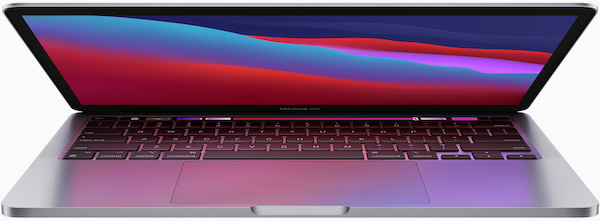
    MacBook Pro with M1 Apple Silicon Impressions

    Source: Apple, Inc

    A lot has already been said about Apple’s new M1-powered Apple Silicon Macs.  After two months of use, I wanted to share my thoughts on my new 13-inch MacBook Pro laptop with the M1 Apple Silicon chip.

    The M1 CPU is the first processor in the new Apple Silicon line of processors.  The Apple Silicon M1 processor takes over for Intel Core i-series processors that are commonly used in today’s PCs.  After having announced the Intel to Apple Silicon transition at last summer’s WWDC developer conference, the first Macs running M1 have appeared: the 2020 MacBook Air, the 2020 13-inch MacBook Pro, and the new 2020 silver Mac mini.

    The selection of the MacBook Air to receive the new M1 CPU caused me to raise an eyebrow.  I was expecting Apple to add the new CPU to a Mac with lower sales volume.  the MacBook Air, because of its low cost, is by far the most popular Mac that Apple sells.  In my opinion, this speaks volumes to Apple’s confidence that the M1 is ready for prime time.  In a November 2020 interview with The Independent’s Andrew Griff, Craig Federighi, Senior Vice President Software Engineering, said:

    “We overshot,” said the exec. “You have these projects where, sometimes you have a goal and you’re like, ‘Well, we got close, that was fine.’ This one, part of what has us all just bouncing off the walls here — just smiling — is that as we brought the pieces together, we’re like, ‘This is working better than we even thought it would.’”

    The move from Intel CPUs to in-house designed M-series CPUs is driven by three key business points.  The first is that Apple wants to be in complete control of all of the key technologies that are used in their products.  In Macs, this means the CPU.  The second key driver has to do with the pace at which Intel has been able to make their CPUs smaller and more power efficient.  (My apologies for the CPU nerds for the oversimplification here.)  The final driver is Apple’s belief that the features on the Macintosh roadmap are simply are not possible with off commodity parts.  Apple is able to ship the features that they do by designing hardware and software together.

    Hardware

    From the outside the 2020 13-inch MacBook Pro looks like the last several models of MacBook Pro.  Without close inspection, the 2019 Intel and 2020 M1 13-inch MacBook Pro look identical when placed on a table next to each other.  Anyone hoping for a chassis makeover or the addition of new features like a touch screen, will have to wait for a future model.

    On the inside, however, replacing the Intel CPU with the M1 has three major advantages.  The first is that the entire computer feels zippy.  In the two months that I have been using my MacBook Pro, never once have I yelled out, “Oh, come on!” like I am apt to do with my 2015 27-inch iMac when tasks take longer than I expected.  The second is that the battery just lasts.  Normally, we should roll our eyes at over-the-top vendor claims about battery life, but in this case, Apple’s claim is warranted.  With average usage for personal and business tasks, the battery life is amazing.  In my testing, the biggest battery drain on the battery was a non-optimized version of Microsoft Teams.  In a one-hour meeting, where I had the 720p FaceTime HD camera (Apple, what year is it?) and a hot mic using a wired connection to a pair of Beats Studio headphones, the battery took a 10% hit.  (Shortly after my Teams testing, an M1 optimized version of Teams was released and the battery performance did improve.)

    Using Safari, Microsoft Office, Tweetbot, BBEdit, and several other common apps, do not appear to have an enormous impact on the battery like they did on my 2016 15-inch MacBook Pro with an Intel Core i7 CPU.  And while I know that the 13-inch MacBook Pro has a fan in it, I have never once heard it.  Maybe it’s my old ears.  Or, maybe, I just can’t push the MacBook Pro hard enough to get the fan to kick on.  This is true even when I am running the pre-release version of Parallels Desktop with the Microsoft Insider build of Windows 10 for ARM CPUs.  Running a Windows 10 Pro virtual machine on my 15-inch MacBook Pro made the fans spin shortly after booting Windows.  I just wanted to run Visio, not launch a Saturn V rocket.

    Software

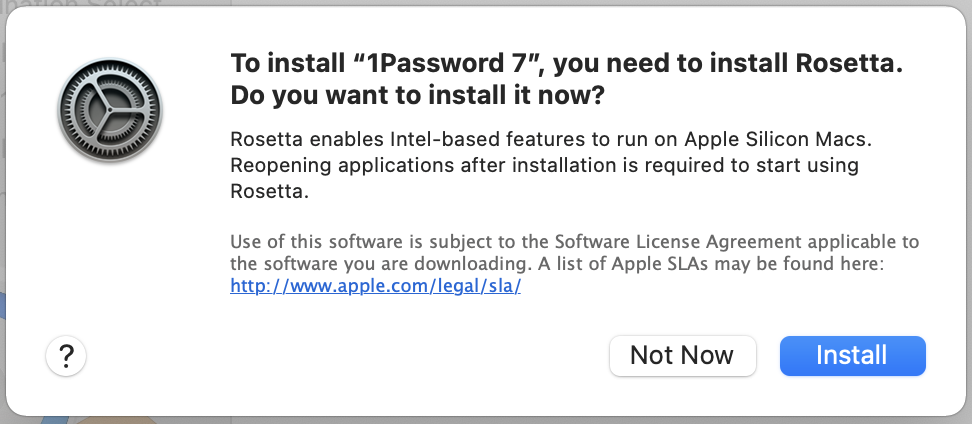
    Macs with the M1 processor run on the pre-installed macOS 11.0 Big Sur operating system.  Big Sur has been written specifically to run on the M1 hardware.  An Intel version of Big Sur also exists for Macs that have Intel CPUs.  Big Sur has two software modules that help the M1 work so well.  They are Universal Binaries, programs that are able to run on both Intel and M1 Macs, and Rosetta 2, a translation module that converts instructions from Intel-only programs into their M1 equivalent instructions.  I unboxed my M1 MacBook Pro and started using it.  It wasn’t until a few days later did I think to see if any of the apps I was using had been updated for the M1.  In the early days of using M1, many were Intel versions.  Over time, more apps have been updated as Universal apps.  The only indication that I was running an Intel application under Rosetta 2 was a one-time message indicating that I needed to install the Rosetta module.  Requesting users download the Rosetta module is likely due to the complexities of getting new hardware and software out the door – an already complex logistics problem further complicated by a global pandemic.  I would expect that new M1 Macs purchased and delivered in 2021 will ship with this module already installed.

    Rosetta first run module install prompt

    There are two other software modules that allow M1 Macs learn new tricks.  The first is support for iOS and iPadOS apps.  I installed UsTwo Game’s Monument Valley as a test.  iOS and iPadOS games and apps are installed from a special tab in the Mac App Store.  The install worked just like any other app.  The app launched and ran just like the Intel version of Monument Valley that I have installed on my iMac.  The input for Monument Valley is straight forward tap and swipe when the game is running on an iOS device.  On a M1 Mac, that translates into mouse clicks and click and drag mechanics.  Your mileage will vary based on the apps you want to run.  Some iOS app developers have opted their apps out of automatically being made available for M1 Macs. (I’m looking specifically at you, Netflix and Disney+.)

    The fourth and final new module in Big Sur for M1 Macs is the Virtualization module.  This module is specifically designed to allow users to run alternate operating systems.  At the time of this writing, virtualization on M1 is still premature.  I have been able to use the pre-release beta version of Parallels Desktop to install and run the ARM versions of Microsoft Windows 10 ARM Edition, via the Microsoft Windows Insider program, and Debian ARM64 edition for PCs.  Both work well, however, as with all pre-release beta software, there are some bumps in the road.  Again, your milage will vary depending on the hypervisor software and guest operating system software you want to run.  Overtime, support for running guest operating systems will get better.

    If the Parallels Desktop software is a leading indicator, be prepared to have to reinstall your guest OS and application software in your virtual machine.  It is not possible, today, to copy over or convert an existing Intel-based OS to run on the M1.  I have to perform fresh installs of Windows 10 Pro and Debian Linux and reinstall my apps.  For me, this a deal breaker if you need to use Parallels Desktop or VMware Fusion to run business apps on your Mac.  For the time being, I will need to continue running Windows 10 Pro x64 in VMware Fusion on my Intel iMac to be able to continue to use Microsoft Project and Visio when working from home.

    Conclusion

    Overall, I like the new 2020 13-inch MacBook Pro with the Apple Silicon M1 CPU.  The Mac boots up quickly and Touch ID is amazingly fast.  macOS Big Sur has been running trouble free, but I do have a few software nits to pick, none of which are serious.  The PC is responsive, and the Mac is waiting for me and not the other way around.  I do prefer the extra Thunderbolt / USB-C ports on the 15-inch and 16-inch MacBook Pros, but I wanted the new shiny toy, and giving up two ports was worth it for me.  I also miss the larger screen and higher resolution of the larger MacBook Pros.  This particular issue is addressed by connecting the MacBook Pro to a Dell WD19TB dock, which is connected to an old 27-inch Dell UltraSharp monitor.

    Looking forward, I plan on using this MacBook Pro for a couple of years until the second-generation hardware comes out.  In all likelihood, a 2020 Mac with an M1 processor will easily run for many years to come.  Knowing myself, by the time late 2022 rolls around, I’m be looking to upgrade to larger MacBook Pro with a M2 processor in it with four Thunderbolt ports.

  • apple,  macbook pro,  powerbook,  rumors

    Are the 2021 MacBook Pro Models About to Go Back to the Future?

    Source: Pintrest.com

    New porting by Juli Clover for MacRumors.com suggests that the 2021 MacBook Pro models might be picking up design language used by iPhone 12.

    “The new MacBook Pro machines will feature a flat-edged design, which Kuo describes as “similar to the iPhone 12″ with no curves like current models.”

    Clover is reporting on a new investor note written by Ming-Chi Kuo, who has is finger on the pulse of the Apple hardware supply chain.

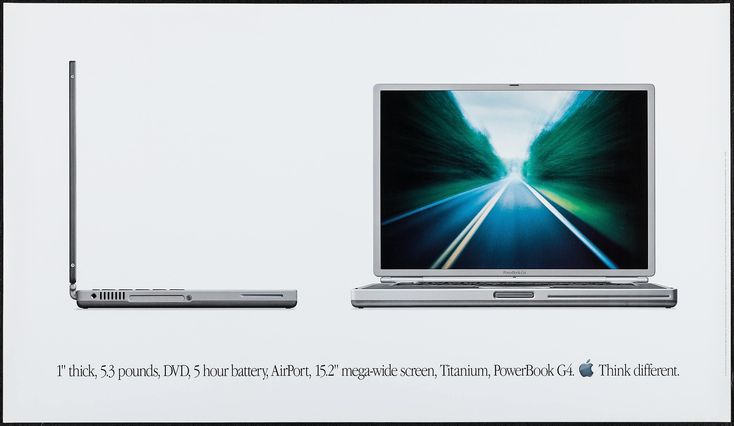
    I enjoy using my iPhone 12 Pro Max and I love the way the flat sides feel in the hand. I am reminded daily of the classic look and feel of the iPhone 5-series. When I think of a MacBook Pro with flat sides around body and display, I don’t think of iPhone 12, iPhone 5, or even iPhone 4. No, as a long time Mac nerd, I harken back to the Mac that could have possibly inspired the flat side design of the iPhone 4, namely, the 2001 Titanium PowerBook G4.

    Source: John Tso, YouTube.com

    Compared with the black plastic PowerBook G3 released in 2000, the “TiBook” as fans call it, traded in the curves for clean straight lines and a much thinner design. In the Apple press release, Steve Jobs remarked:

    “The all new Titanium PowerBook G4 is the most revolutionary portable computer ever created. Its a ‘supercomputer to go’ in terms of performance, yet it’s thinner and sexier than the best subnotebooks.”

    Writing for MacWorld back in 2015, Christopher Phin, has a delightful retro comparison of the then current MacBook Air with a PowerBook G4. It’s worth taking a look at the photos in his article. They show off what a flat edge MacBook Pro in 2021 might look relative to recent Apple Silicon and Intel-powered MacBook Pro designs.

    Packed into TiBook’s 1-inch thick body was all the connectivity that a Mac power user would ever want, including Ethernet, USB, FireWire, VGA, and S-Video – all without the need for adapters. Imagine being a MacBook user in 2021 without having to make an expensive trip to Dongle Town.

    Could Apple be looking to the 2001 PowerBook G4 as inspiration for a new professional Apple Silicon M1 powered 14 and 16-inch MacBook Pro? I hope so.

  • accessories,  apple,  case,  iphone 12

    Apple Leather Case with MagSafe Review

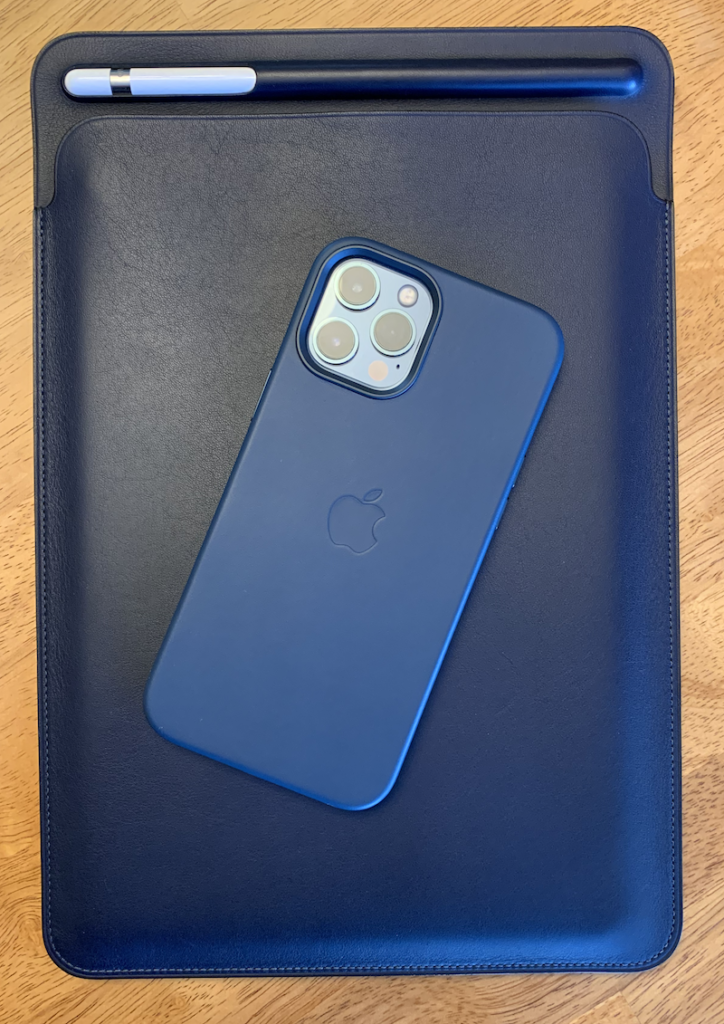
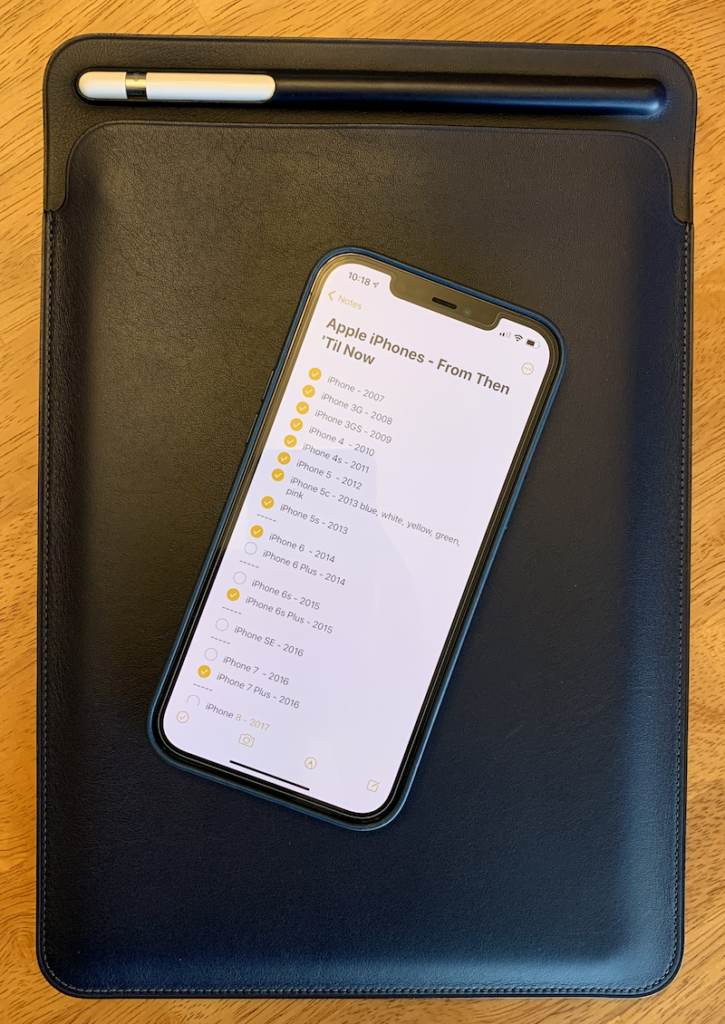
    One of the great things that I really like about the new iPhone 12-series of smartphones from my favorite fruit company is the return of the iPhone 4 and 5-series flat slides. And the return of the flat sides comes the drop in style flat side Apple Leather Cases. Here’s my review.

    What Works Well

    There are many third-party cases for iPhones on the market today. I prefer the first-party cases for a few different reasons. Long time readers of this blog will know that I am a life-long Apple customer and fan. So, for me, many times, if there is a first-party accessory available, that is the one I will get.

    With that out of the way, I also prefer first-party accessories for their full support of new features. For the iPhone 12-series, that means the ability to use MagSafe. MagSafe is Apple’s new inductive charging solution. Previous iPhone models and cases were compatible with inductive charging. However, with the iPhone 12 leather cases, the charging magnets are integrated with the case. The real benefit of having MagSafe magnets in the iPhone and in the case is that it is easier for the user to align the charging coils. People who receive a lot of vibrate notifications can be assured that the iPhone will stay put on the MagSafe charger – something that was not a guarantee in non-MagSafe inductive chargers.

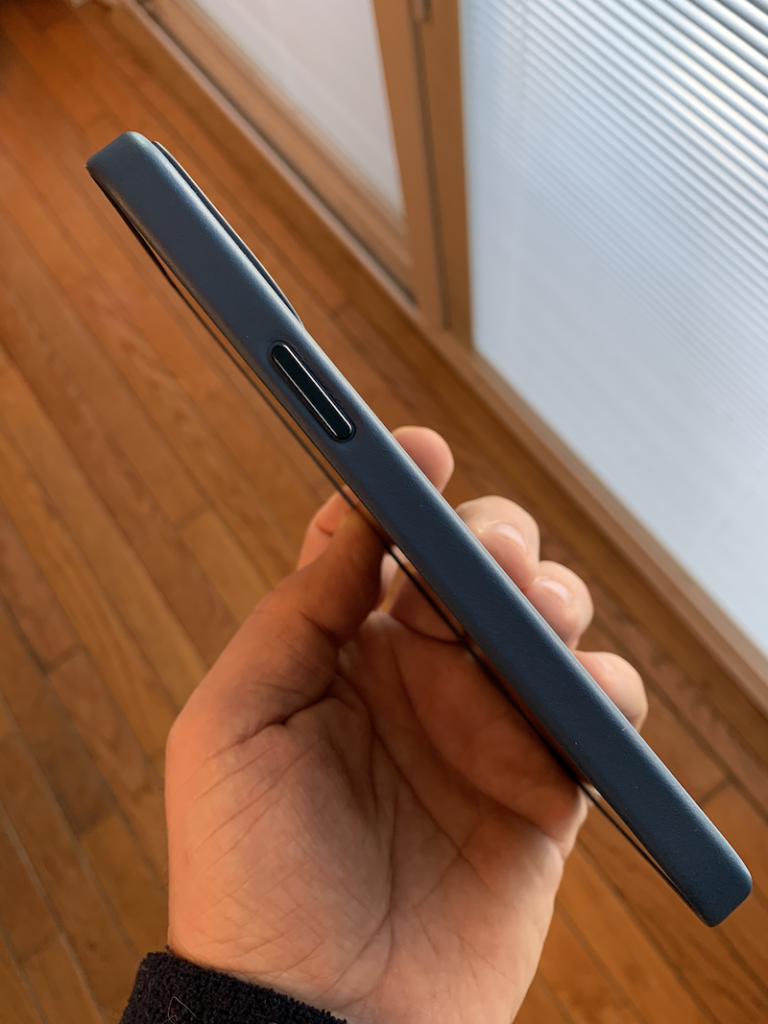
    The case build quality is quite nice too. The iPhone 12 Pro leather cases have a softer touch to them than the Apple leather cases that I used on my iPhone 11 Pro. The edging and seam where the leather meets the soft interior lining mate up well. May Dad thinks that the Apple Leather Cases are slippery. And, in my opinion, new cases are. But once you start carrying them around in backpacks, purses, or jeans pockets, they will wear nicely. With previous versions of the leather case, I found that it took longer to break in the case while wearing dress pants to work every day. Now my iPhone 12 Pro Max mostly sits on my desk or coffee table.

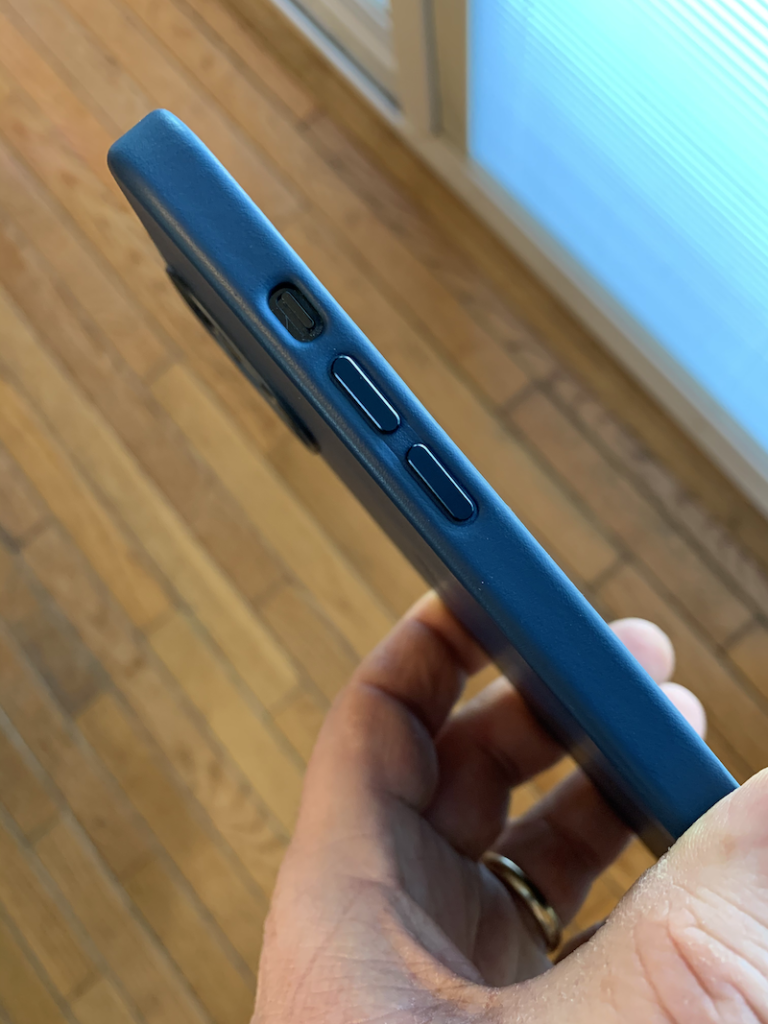
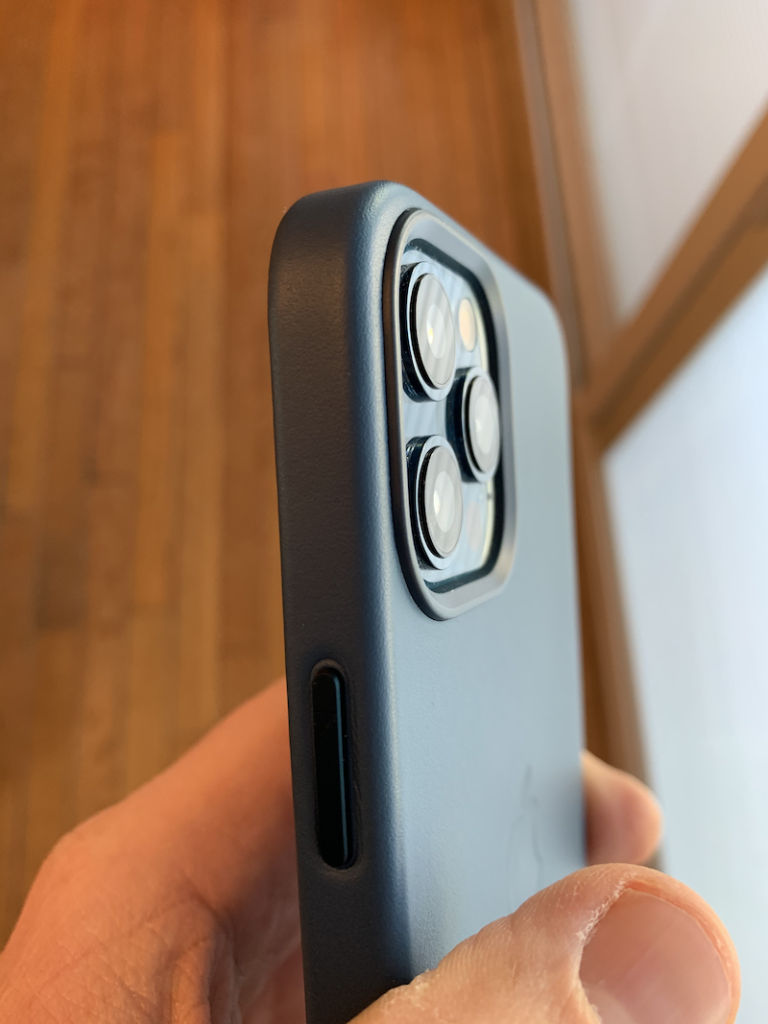
    In addition to the feel of the leather, I also appreciate the use of metal volume and power buttons that are built into the case. Pressing the buttons on the case feel satisfying. The button press feels as if there wasn’t a case on the iPhone at all. In my opinion, the metal buttons feel much better than the rubbery caps found on the Apple Clear Case or leather lumps that Apple used on the leather cases for the iPhone 5/ 6 /6S series. In comparison, I think that the metal buttons are just easier to press after having lived with other button options.

    Some Room for Improvements

    As the saying goes, you get what you pay for. In Apple’s case you are often paying for quality. 1 The Apple’s leather cases are made well, but, before you order one, you have to ask yourself if Apple’s cases are worth it. The iPhone 12 / 12 Pro / 12 Pro Max Leather Case with MagSafe is $59. That’s pretty expensive. If you want to add a Leather Wallet with MagSafe, that will cost you an additional $59. 2. If you are looking for an alternative to Apple’s leather cases, Nomad’s Rugged Case series look handsome and cost less ($49.95).

    I also think it is less than great that there is a plastic ridge that rises up around the camera bump. While this protects the glass camera lens, the iPhone is unstable when being used while laying face up on a flat surface. The wobbling of the case irritates me.

    Based on my past use of iPhone leather cases in red and yellow, the corners of these cases will wear and patina quickly. In my experience, more so when riding around in jeans pockets. Darker color Apple cases will do the same thing, but they will be less noticeable.

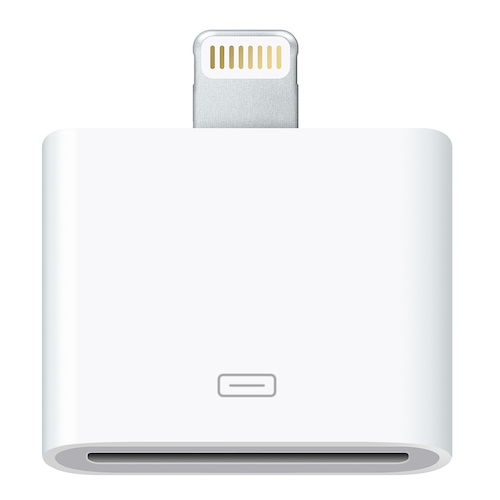
    Accessory adapters like the Lightning to 30-pin adapter won’t work with the Leather Case with MagSafe

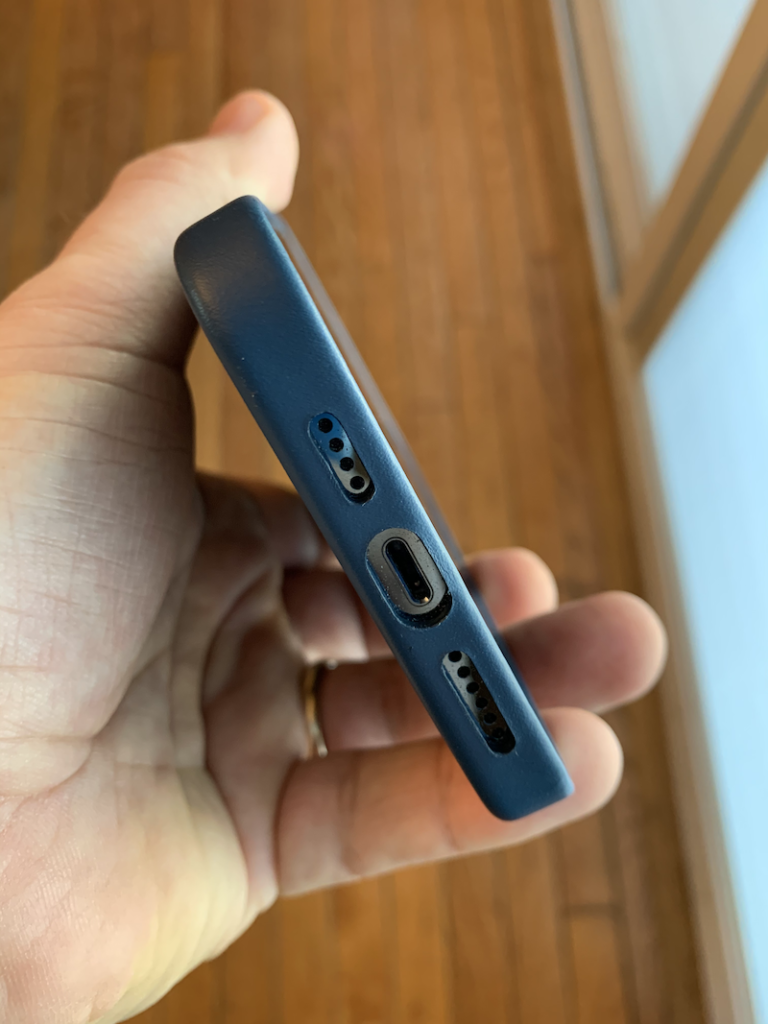
    The last think that perspective buys will want to know is that the bottom edge of the iPhone 12-style leather cases are boxed in. That is to say, that there is a single continuous edge around the entire iPhone 12. The first-party cases for the iPhone X/ XS / 11 Pro all featured an open bottom edge. Some people like an open edge with the speaker and Lightening port completely unobstructed. For iPhone 12, the bottom edge should offer more protection for iPhones that are knocked off tables or otherwise dropped. However, if you use an accessory that has a thick cable connector, like the Lightning to 30-pin connector that is in the 10-year-old car that my kids drive, well, maybe the Apple leather case isn’t for you.

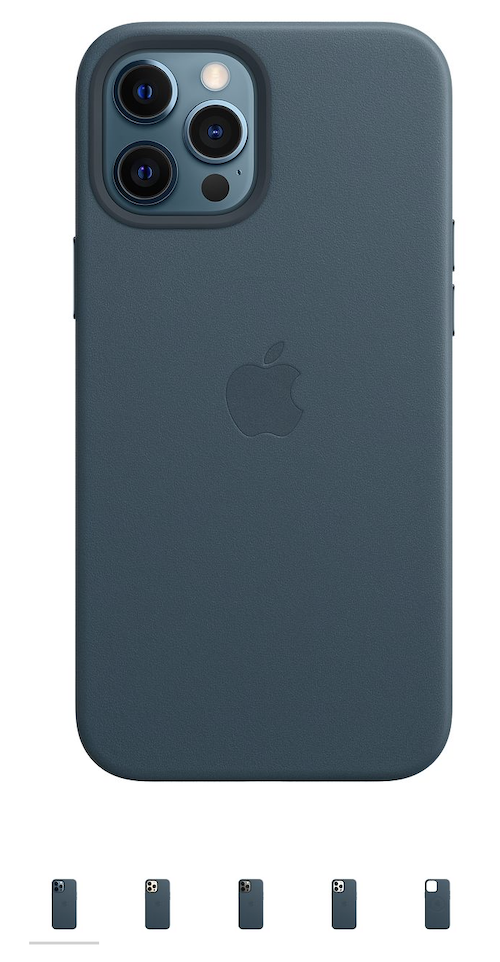
    Wby can’t Apple’s product pages show the slides and bottom edge of the case?

    A personal gripe that I have with Apple is the product photography that has been used for the leather case. Would it really be a problem to show the case from all sides? As a perspective customer about to spend $59 on a case, I don’t want to be left wondering what the button covers and bottom edge look like. I found it completely aggravating that I couldn’t see those angles on the product page.

    Conclusion

    If you want the premium fit and finish of an Apple product, you will probably want an Apple Leather Case with MagSafe. You will enjoy using it. Depending on the other iPhone accessories you may have in your life, or if you don’t feel like dropping another $59 or more for accessories on top of the expense of the iPhone itself, you may want to look at the similarly featured less expensive offerings from third-party case makers.


  • cause analysis,  information technology,  lifestyle

    The CDC’s COVID-19 Test Design Failure as a Lesson for IT Pros

    David Willman, writing for the Washington Post on December 26, 2020, in an article titled: The CDC’s failed race against covid-19: A threat underestimated and a test overcomplicated:

    “We at the CDC also have the ability to do that today, but we are working on a more specific diagnostic,” Messonnier said, indicating that the agency was seeking a more sophisticated test.

    “We had a conversation with [Stephen Lindstrom] and [Julie M. Villanueva] and asked, specifically: ‘Lots of members are asking if we can drop N3 and just keep N1 and N2,’ ” recalled Kelly Wroblewski, director of infectious diseases for the professional association, based in Silver Spring, Md.

    “And their response at that point was: ‘FDA isn’t going to go for that.’ Both of them were like, it’s a non-starter.’’

    Government officials later told The Post that the FDA would have considered proposals to remove N3.

    Some CDC scientists also were questioning among themselves the need for N3.

    “Why are we trying so hard? . . . We know there’s a problem with it,” one of them recalled asking.

    Instead of dropping N3, the CDC set about trying to manufacture a new batch of reagents in hopes of eradicating possible contamination that had caused the false positives.

    What I find most interesting about this article is CDC’s insistence on keeping the N3 test as part of the testing protocol to see if a patient is COVID-19 positive or not. As I kept reading the article, I was thinking about my own blind spots and biases when working on complicated information technology solutions. Can IT’s insistence to have a complex solution, such as a PowerShell script, C# code, or a SQL stored procedure, cause a CDC-style 46 day delay in testing when a more streamlined WHO-style solution is readily available? Can technologists, like the scientists in Willman’s article, get caught up in the “we are going to solve this” tide? When we get swept up in a fast moving production issue, do we have the wherewithal to take a step back and decided that “good enough” is indeed good enough to solve the issue? Or do we take extra time to take a deep dive into the issue to develop an overly complex solution?

    As information technology professionals, we all need evaluate our unique production environments. What tools are available to us? How much time is available to diagnose the problem and identify a most probable cause? How much time will it take to test and evaluate the performance of the fix? Often times, there is no one size fits all solution. The key takeaway from this article for IT professionals is to be mindful the problem we are trying to solve and to balance “good enough” verses “perfection” when developing technology solutions.

  • 1src,  centro,  palm

    Here Comes Centro Claus

    Palm Centro Holiday Ad Campaign 2008

    With the holidays just days away, I am listening to many of my favorite classic and modern Christmas albums. As a nerd, my favorite tech holiday album, hands down, has to be Claus Remixed: Santa’s Gone Centro. Centro, as in the Palm Centro – the smaller Palm OS sidekick to the larger Treo 755p. For the youngsters in the room, or for us old geezers who may have forgotten, 2007’s Palm Centro was the iPhone 12 mini of the day.

    Palm Centro Holiday 2008 Ad Campaign

    In an attempt to convince people how cool the Centro was, in December 2008, Palm put together an over the top social media campaign. As part of that campaign, several videos were posted to Facebook and a promotional CD was released with funky holiday themed tracks. The included tracks were:

    • Christmas In Hollis – Rondo Brothers feat. Motion Man
    • Jingle Funk – Breakestra
    • The First Noel – Donavon Frankenreiter
    • Winter Wonderland – Johnny Mercer
    • Hanukkah Oh Hanukkah – Erran Baron Cohen
    • Samba Dreidel by Pacha Massive

    Of the tracks on the album, Christmas In Hollis is my favorite and I would use the first few seconds of the track in a few of the 1SCR.com Palm Powered Podcast episodes in December.

    There is not much archived online from this popular Palm ad campaign for the Centro smartphone. For those who want to put this campaign in perspective, Steve Hawley still has a short video posted to Vimeo that highlights the positive outcomes from the campaign.

    Palm Centro Unlocked GSM edition
  • gadgets,  sony

    Selling Chinese Gadgets in the United States

    While skimming through some YouTube videos, I stumbled across Ashley Carman’s video for The Verge titled The challenges Chinese gadget creators face about some of the struggles that Chinese gadget makers face when trying to sell products into western markets, specifically, the United States.

    As an American technology enthusiast, I tend to follow the products that are developed by domestic companies like Apple, Amazon, Microsoft, and Twitter. Sony, a Japanese company, for me at least, does not bring up feelings of a negative view point. In fact, it has a nostalgic feel to it. There is something special about Sony hardware design that resonates with me. The 1979 Sony Walkman and the unabashedly yellow Sony Sports Walkman, and the Sony Discman D-20.

    When when I think about Chinese gadgets, I unfortunately conjure up negative feelings that Sony does not. Chiefly among these China detractors are the Chinese government itself, censorship from the Internet and the Great Firewall, and the vast amount of counterfeit goods that can be found on Amazon, eBay, and others.

    However, as Carman points out, these negative US-centric biases can create significant barriers for Chineses companies that what to expand outside their home market. And these barriers can keep new innovative products out of consumer’s hands. You should watch the piece. All of this to say, I found the video to be both informative and, more importantly, made me think about Chinese companies as individual entities to be considered on their own merits.

  • macos,  microsoft,  virtualization,  vmware,  windows 10,  windows server

    Building a Virtual Active Directory Test Lab

    Windows Server Core, Windows 10 Pro, and macOS Big Sur in an AD domain.

    It has been a long time since I build a Microsoft Active Directory lab environment. Years ago, I put together a test lab with physical white box machines that I built. The popularity of virtual machine technology makes all of that space hogging, wires everywhere, make your wife annoyed mess a thing of the past.

    This will be the first in a series of posts about how I setup a virtual test lab using VMware Fusion on my Mac.

    Microsoft Insider Programs

    I have been dabbling with virtual Ubuntu machines over the last year or so, and I wanted to do something a little different. Microsoft offers IT pros a few of their products free of charge, for non-production use, of course, for training and development purposes as part of the Insider program. IT types who want to play along will be interested in the Windows 10, Windows Server (Core), Visual Studio Preview, and SQL Server Developer. There are also programs for Microsoft Edge and Office 365, if you are so inclined.

    Make Up of the Lab

    I’m looking for a playground so my requirements are pretty low. To build my virtual lab environment I will be using my everyday use 2015 5K iMac with a 3.3Ghz Quad-Core Intel Core i5 CPU and 32GB of RAM. Faster CPUs and more RAM is always better, however, in 2015 my needs were different. I am also running VMware Fusion Pro 12 as the hypervisor on my iMac. Due to the physical constrains of my iMac, not all of these virtual machines will be running all the time. Likewise, they will not be optimized for speed.

    As a side note, anyone purchasing a new M1 Apple Silicon powered Macintosh – the 2020 MacBook Air, the 2020 2-port USB-C 13-inch MacBook Pro, or the 2020 silver Mac mini – will not currently be able to run virtualization technology like VMware Fusion or Parallels Desktop because these apps haven’t yet been updated to work on M1 and Apple’s new virtualization technology layer.

    For my initial lab setup, I plan on deploying the Insider editions of Windows Server Core, Windows 10 Pro, and then building an Active Directory domain to manage the environment. Then, I added a virtualized macOS 11 Big Sur VM. In the future, I plan to deploy an IIS web server on my domain controller and the developer edition of SQL Server on another AD member Core server. I will be using Microsoft’s RD Client for macOS to connect to the Windows machines. To network the virtual machines together, I will use the “Share with my Mac” VMware Fusion networking option. From my home network perspective, there will only be one DHCP3 IP network address being used (by my iMac) and each VM will get it’s own private IP address thanks to the magic of NAT4.

    VMware Fusion 12’s Network NAT Option

    For my next article in this series, I will discuss the setup process for Windows Server Core.

  • lifestyle

    Happy Thanksgiving!

    This year’s Thanksgiving will be different from any other that we have had in the past. During this difficult period, it is important to take a few moments to remember what is really important and to be thankful for what we have.

    Thank you to everyone who reads my blog. I appreciate it.

    Have a Happy Thanksgiving! Stay safe. Wear a mask. Together, we will get through this!

    -Alan