I have been working on restoring an Apple Power Macintosh 7100/80, first released in 1994. While tearing it down to remove the original PRAM battery from 1994, I decided to also pull out the 3.5-inch floppy drive to service it before attempting to power on the Mac.
What I discovered was that I couldn’t find any documentation (service manual, blog post, YouTube video) about how to open the drive without breaking the plastic faceplate. So, I made a video of me fumbling around trying to open the drive so you don’t have to wonder how to open it or break any plastic clips.
While flipping through Mastodon on Sunday morning, I saw a toot linking to an article on Mashable.com written by Cecily Mauran covering a new European Union legislation that all batteries sold in devices must be end-user replaceable by 2027 and contain 80% recycled materials by 2031.
There are two benefits to this new regulation as I see it.
Foster customer right to repair efforts to reduce e-waste
Conserve and recycle natural resources, reducing greenhouse gas emissions
Directive 2008/98/EC and Regulation (EU) 2019/1020
The new law is part of Directive 2008/98/EC and Regulation (EU) 2019/1020. In the updating of the Directive and Regulation, Directive 2006/66/EC is now considered repealed.
The legislation rightly identifies the growing global demand for batteries as a long-term trend.
“In view of the strategic importance of batteries, to provide legal certainty to all operators involved and to avoid discrimination, barriers to trade and distortions on the market for batteries, it is necessary to set out rules on the sustainability, performance, safety, collection, recycling and second life of batteries as well as on information about batteries for end-users and economic operators. It is necessary to create a harmonised regulatory framework for dealing with the entire life cycle of batteries that are placed on the market in the Union.”
The legislation also states that laws governing the management of waste batteries must also be updated “to protect the environment and human health by preventing or reducing the adverse impacts” of batteries.
As someone who support climate science and initiatives to reduce carbon emissions that are warming the earth, I applaud the EU’s effort to build a sustainable circular battery supply chain.
EU Regulatory Impacts to iPhone
But what about us here in the United States? In my opinion, the absolute breakdown of the Congress to actually negotiate on bills and pass legislation means that there will be no unified federal regulations about battery reuse on par with the EU’s efforts. Rather, we here in the US will be left with a patchwork effort by states and corporations to advance greenhouse gas emission reduction and meaningful recycling programs.
While this regulation does not directly apply to the US, it is an open secret at this point that Apple will finally switch the iPhone to USB-C, replacing the Lightning port after an 11-year run. It is cheaper for Apple to switch the iPhone to USB-C than to try and maintain a USB-C iPhone to be sold in the EU and a Lightning iPhone to be sold everywhere else. In other words, there is a financial incentive for Apple to get on board with USB-C for charging and sync’ing data. I applaud this decision as the iPhone is effectively the only electronic device that I use daily that does not already use USB-C for charging. In my opinion, the move to USB-C from Lightning on the iPhone was long overdue.
It’s easy to get behind an EU ruling when you agree with the position they are taking. But what about rulings that you don’t agree with? Am I as willing to accept that EU rules can change the iPhone I use every day in a detrimental way? Let’s take a more reasoned approach to my initial thinking.
User Replaceable Batteries Alone Won’t Make iPhone Thicker
My first reaction to this new EU regulation was, “I don’t want a thicker, heavier iPhone”. My mind instantly went to the Palm Treo 700p, the Blackberry Curve 8330, and Android devices. They were all like carrying around bricks when set down on a table next to the original 2007 iPhone.
Consider the thickness (depth) of these mobile devices:
Smartphone
Depth
Weight
Palm Treo 700p (2006)
0.89″
181g
Apple iPhone (2007)
0.46″
136g
BlackBerry Curve 8330 (2007)
0.59″
113g
Apple iPhone 6 (2014)
0.27″
129g
Apple iPhone 6 Plus (2014)
0.28″
189g
Apple iPhone XS Max (2018)
0.30″
208g
Google Pixel 6 (2021)
0.4″
207g
Apple iPhone 14 Pro Max (2022)
0.31″
240g
Samsung Galaxy S22 Ultra (2022)
0.35″
228g
Having reached what I call “Peak Thinness” with 2014’s iPhone 6 and the ridiculous “bendgate controversey” that went along with it, I cheered for the internal battery. A Treo 700p is comically thick compared to the iPhone 6. The thought of putting a user replaceable battery into the iPhone for the first time gave me shivers as I began thinking about battery doors, clips, and a big ol’ chunk battery like the ones used in early smartphones.
But looking at the technical specifications of the smartphones listed above, they are already getting bigger, thicker, and heavier.
With this trend in smartphones, and I’ll speak specifically to the iPhone, might some of the world’s best mobile device engineers be able to simultaneously add features and accommodate an end-user replaceable battery? I think it could be possible in 3 – 4 years.
With the iPhone 15, the next iPhone that is expected to be released in September 2023, Apple is already rumored to be making slight body changes. iPhone 15, as mentioned earlier, is rumored to have a USB-C port, which is physically larger than Apple’s proprietary Lightning port. More powerful camera lens systems also necessitate a thicker body. Anyone else remember when the iPhone 4 would lay flat on its back on a table relative to the seesaw that is a recent generation iPhone on its back? Apple is also rumored to be making a switch from stainless steel bans on iPhone Pro models to the lighter medal, titanium, in an effort to offset weight from a larger battery.
We will see what pans out in September, but with a clear trend line that iPhones are getting thicker and heavier, it would seem there is some wiggle room to add hardware changes to support a battery that is easier to replace.
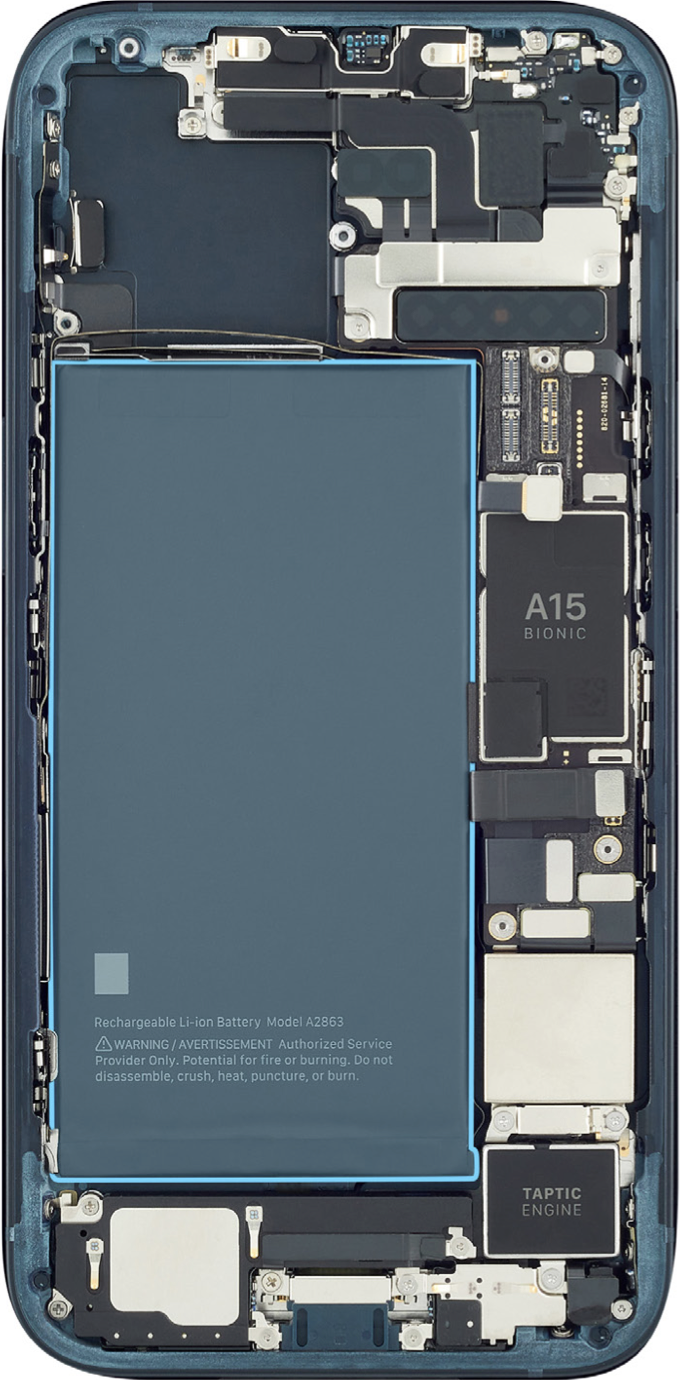
The inside of an iPhone 14 packed wall-to-wall, as can be seen in the photo (above) taken from the Apple iPhone 14 Repair Manual. To remove the battery, one must first remove the back glass to open the iPhone, a procedure that requires the use of a complicated desk mounted contraption. While I am not a mechanical engineer, making the iPhone easier to open seems like a good place to start to make battery replacement easier.
If Apple really doesn’t want to put a user replaceable battery in the iPhone, without the need for complicated equipment, they could just go back to lowering the price for battery replacements to make the repair more accessible to customers. The price of battery replacements dropped to a low of $29 in 2018 following customer lawsuits in 2017 relating to Apple slowing down performance of older iPhones that had aging batteries in them. In 2019, Apple raised battery replacement prices and did so again earlier this year, erasing all of the temporary price reductions put in place in 2018.
Wrap Up
Apple has shown that they can achieve amazing feats of engineering to deliver products that many of us want to buy. But as we will see with the first USB-C iPhone, sometimes that willingness to change and re-invent things requires a little help from world governments. My initial reaction to easily replaced iPhone batteries was likely overblown. With the right motivation and lots of engineering effort, I believe it is possible to keep iPhones from getting overly larger and heavier and still have a battery that is easier to replace than the current process.
The 2023 Mac Pro is a massively powerful Mac, however, anyone seriously considering buying this machine for work needs to understand what it can and can’t do for them.
With the release of the new 2023 Mac Pro earlier this month, Apple completed their CPU transition from Intel CPUs to their own in-house designed Apple Silicon chips. To call Apple Silicon chips “CPUs” is a bit of a misnomer as these chips really are whole System on a Chip (SoC) designs encasing the CPU, GPU, RAM, Neural Engines, Secure Enclave, video encoders and more. From my “old man” view, the Apple Silicon is like the whole system board, or motherboard if you’re from the PC camp, all rolled up into a single chip on today’s Macintosh computers. (Side Note: The Apple II series system board was referred to as “the circuit board” in Apple documentation in the late 1970s into the early 1980s.)
The transition from Intel to Apple Silicon was originally stated to take two years by Tim Cook. Having lived through the PowerPC and Intel transitions already, I was not surprised with a two year timeframe. Apple is a company that knows how to do this sort of thing very well. The transition, clearly derailed by a global pandemic, ended up taking three years. Overall, not to bad, in my opinion. However, by the end of Apple’s March 2022 keynote address, the 2019 Mac Pro was already started to feel past it’s sell by date when John Ternus would hint that more news was coming soon about the Mac Pro. As it turned out, it would be another 14 months before the new Apple Silicon Mac Pro would begin shipping to customers. Years from now, I would love to read about what happened to this version of the Mac Pro. Clearly something went wrong and the project needed to be recalibrated. Perhaps, the design of this machine will become an Apple University lesson.
The 2023 Mac Pro, now shipping to customers, is Apple’s highest of high-end machines. It comes equipped with the highest of high-end SoC chip to date: the M2 Ultra. And a price tag to prove it. The Mac Pro starts at $6999. If I was able to use Uncle Tim’s Apple Card, the Mac Pro configuration I would order (base M2 Ultra, 128GB RAM, 4TB SSD) comes in at $8,799 or $733/mo for 12 months. By comparison, my M1 Pro Mac Studio was a bargain at just $2,999. Apple also announced the the M2 Max, which is available in updated MacBook designs. These new chips join the base M2 SoC released in January.
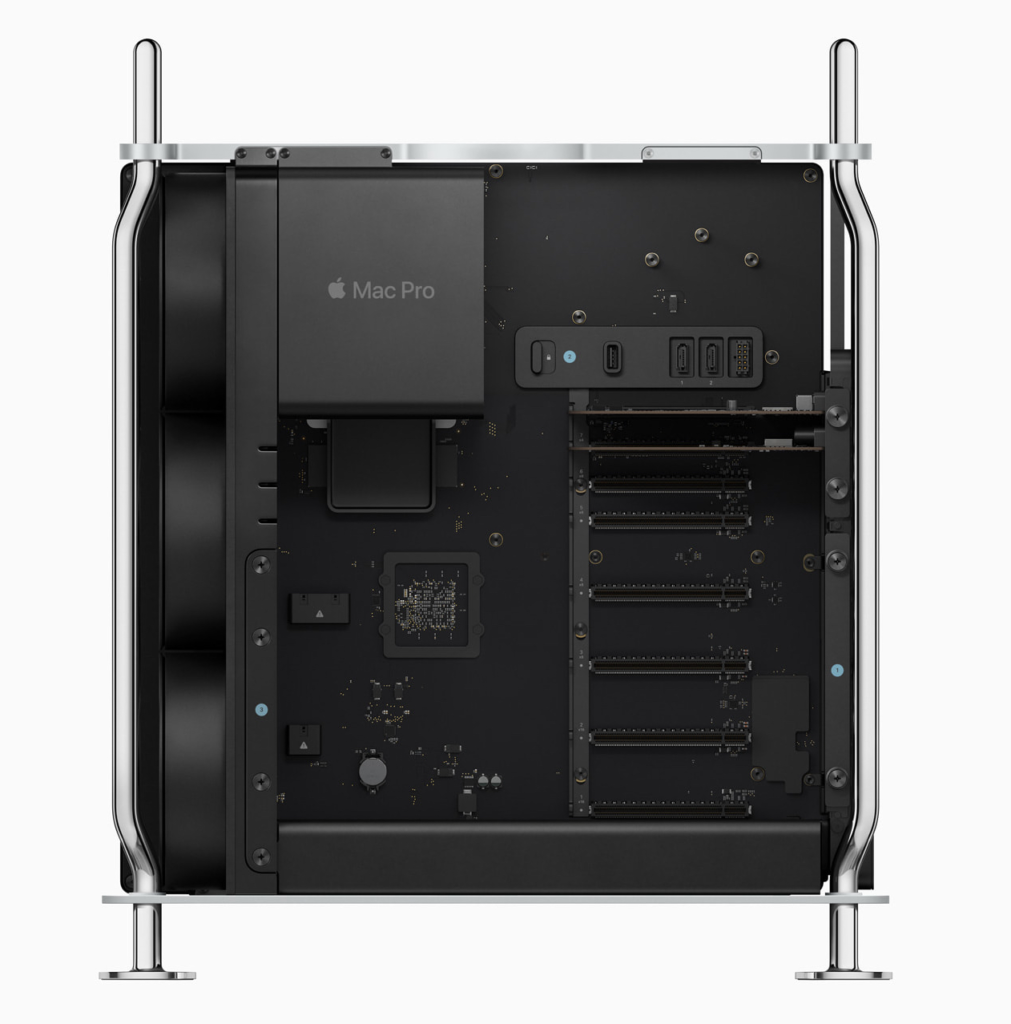
On the outside, the new Mac Pro looks almost exactly the same as the previous Intel model, which is completely fine in my opinion. I’m sure Apple chose to re-use the exterior case design as a means to recoup design costs. I like the idea of having expansion bays so that you can stuff it full of expansion cards. Just like I used to do with my Apple //e. But that’s my old man is showing again. I meant, my PowerMac G4. Whoops, I did it again.
Unlike the previous Mac Pro, the 2023 Mac Pro allows you to add cards to it, as long as those cards aren’t the Afterburner card or a third-party graphics card. The former is now supercharged and baked into the M2 Ultra chip. The latter just isn’t an option because Apple thinks that their M2 Ultra GPU cores are just as capable and are “on package” in the SoC. You can discuss amongst yourselves about whether or not third-party off SoC package video cards could or should be supported. If you’re looking for high-speed networking or lots and lots of internal storage, the Mac Pro is for you.
The Apple Silicon transition was announced in the summer of 2020 during that year’s WWDC. In November 2020, Apple released the first Macs with the M1 chip. That year, I traded in my 15-inch 2016 MacBook Pro (the one with the really loud butterfly keyboard) for a 2020 13-inch MacBook Pro (sans butterfly keyboard). That MacBook should have been renamed “PowerBook” in my opinion because it was way faster than my MacBook Pro and 2015 27-inch iMac.
The 2023 Mac Pro is a power house, for sure. The Mac Pro has become, in my opinion, a show piece. It demonstrates what is capable with Apple Silicon and shows off the raw power of the architecture. As an average Mac user, think of the Mac Pro more like a concept car or an extremely expensive luxury car. Unless your or your organization needs all of the compute power in Mac Pro. Then, it becomes a day-to-day business tool. Apple likes to talk about it’s Pro hardware in terms of audio and video creative work, however, the Mac Pro platform can be used for other high-end needs including engineering and design, big data analytics and academic research, machine learning, and, of course, application development. Being a casual observer, the new Mac Pro looks like it it has all the number crunching capabilities of Unix/Linux and Windows system and more. Examining the Mac Pro more carefully, one can see that it’s greatest strength, the unified architecture of the M2 Ultra, is in some ways, it’s greatest drawback. Because of the unified CPU/GPU/RAM architecture of Apple Silicon, it is impossible to add more RAM or upgrade the GPU. Moving RAM or GPU functions external to the M2 Ultra SoC will decrease overall performance of the system. Ed Hardy, writing for Cult of Mac, explains:
“The weakness of the architecture is that individual components can’t be upgraded. It’s not possible to add more RAM to the SoC, or swap out the GPU.
While it’s theoretically possible to add more RAM off the chip, this would not take advantage of the significant speed boost that comes from memory built into the chip. In short, this add-on RAM would slow down performance, the opposite of the reason why it’s being added. That’s likely why Apple doesn’t offer the option.
The same problem affects external graphics processing units, called eGPUs. Apple used to sell these for Intel-based Macs but has since stopped because they aren’t compatible with the M series.”
And there in lies the conundrum of the 2023 Mac Pro. It’s raw performance comes from the specialized M2 Ultra SoC. At the same time, that same SoC performance is the thing that prevents the addition of more RAM and GPU video cards. While I am sure that these limits do limit the already small pool of customers for the Mac Pro, clearly Apple has optimized the machine for a specific type of customer. When deciding on purchasing a Mac Pro for work, a prospective customer will need to weigh out the options for faster compute vs the need for large data sets in RAM vs the raw horsepower of GPU processing cores.
I am glad that the Mac Pro exists as the very top of the Apple line up. Almost no one should buy this machine as consumer needs will be readily met by other less expensive Macs.
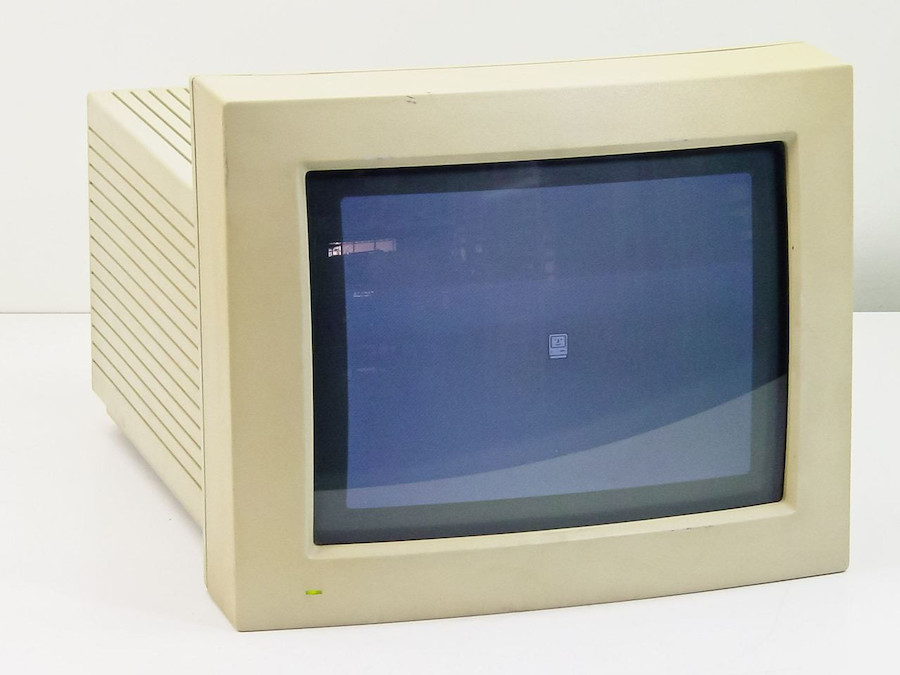
Apple Macintosh RGB Monitor, via RecycledGoods.com
Apple’s Macintosh RGB monitor was intended to be the companion monitor for the company’s Macintosh LC-series of computers.
Before I could set about working on my Macintosh LC III #MARCHintosh2023 project, I needed to service the monitor that my LC (Low Cost Color Computer – I know, the acronym seems to be missing a few letters) was going to need.
Come watch the roller coaster ride of will he or won’t he repair this monitor but stay to see if I electrocute myself!
Control Center is a handy way for accessing various settings on your iPhone, including wireless radio control, Apple Pay, and Music playback.
By toggling a setting on your iPhone, you can restrict access to Control Center with Face ID, limiting casual access to your iPhone’s Apple Pay wallet and controls.
Step 1: Open the Settings app.
Step 2: Scroll down and tap on Face ID & Passcode.
Step 3: Enter your iPhone’s passcode.
Step 4: Scroll down to Allow Access When Locked section.
Step 5: Tap on Control Center.
If you happen to have an iPad or iPad Pro with Face ID, this tip will work for those devices as well.
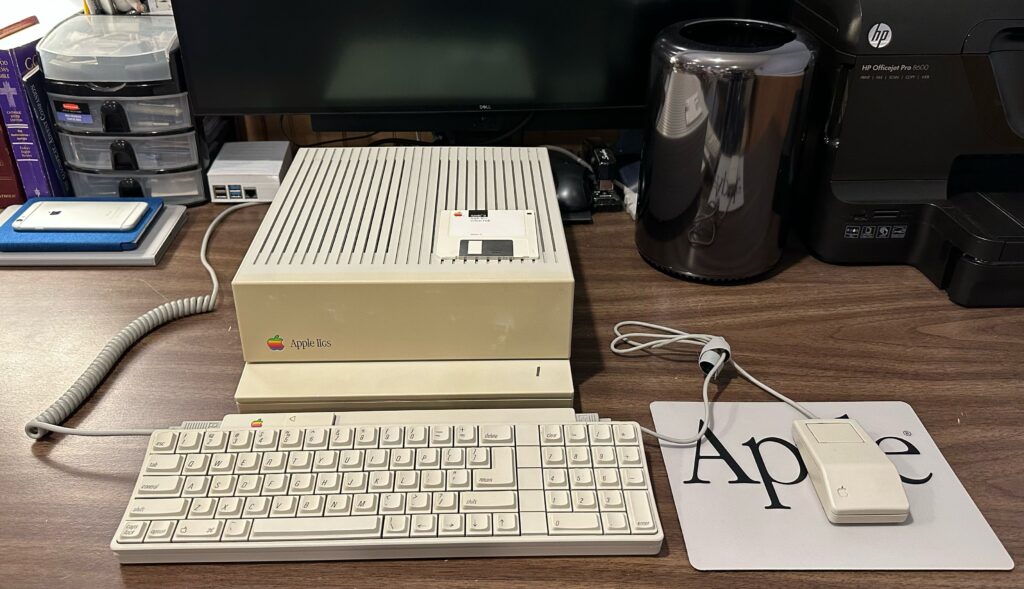
In the final installment of my Apple IIGS Welcome-Home-Athon video series, I talk about the various solutions I tried to get the GS working with a modern LCD display and see what it was like to use System 6.0.1 and Zany Golf on a color display.
Mac Pro (2013) helps welcome home my Apple IIGS (1986)
I’m an Apple //e fan, but in the mid-1980s, with the introduction of the Lisa in 1983 and the Macintosh in 1984, it was becoming clear that the largely text input-based Apple II line of computers needed an innovative refresh.
In 1986, Apple II fans got their new graphical interface upgrade in the form of the Apple IIGS.
Developed under codenames such as “Phoenix”, “Columbia”, and “Cortland” the Apple IIGS was an attempt to modernize the Apple //e and the non-expandable Apple IIc into a modern computer. At the time, attempts to replace the venerable Apple //e with the Apple III and the Apple IIc did not go according to plan. The Apple III ended up being a commercial failure and customers favored the Apple //e over the IIc largely in part due to the //e’s expansion card bays.
The Apple IIGS is a curios machie because it encapsulates both what has come before, the Apple II platform, while embracing a future with a graphical interface, a mouse, improved sound capabilities, and a 3.5-inch floppy drive – just like the Macintosh. Powering the Apple IIGS is the new 16-bit 65C816 chip running at 2.8MHz. The 65C816 is a 65C02 compatible processor, meaning that it can emulate the CPU used in prior Apple IIs. The 65C816 also has two run modes: the native 2.8MHz mode for running software written specifically for the graphical GS/OS operating sytem, and a 1MHz mode for running a customer’s older Apple II series software.
In addition to the new CPU, the Apple IIGS also includes 256kb of system RAM, expandable out to a total of 8MB. The “GS” in the IIGS name stands for Graphics and Sound, and this Apple II is able to deliver. The new GUI interface was made possible due to a new super Hi-Res video mode capable of putting a 16-color palette up on a 200×320 screen. The included Ensoniq Mirage sound chip improved the audio features of the machine.
There is a lot going on under the hood of this Apple II and that’s because the designers needed to address two project goals. First, make it compatible with the older generation of Apple II hardware and software. Second, bring the technology advancements from the Apple III, the Lisa, and the Macintosh to the Apple II line. In short, the IIGS ended up becoming a bridge from the Apple II line to the Macintosh line.1 This feat was made possible by Apple’s new custom integrated circuit (IC) the Mega II. The Mega II included the functionality of several of the ICs from the Apple //e and the IIc into the IIGS motherboard. In the end, the IIGS was able to run at least 90% of the titles in the Apple II software library. With the use of an optional disk controller card and floppy disk drive, the Apple IIGS could also read and write 5.25-inch disks created for earlier Apple IIs.
The Apple IIGS was forward looking too. For example, the graphical GS/OS environment used 114 of the same QuickDraw calls as was found on the Macintosh. The graphical interface program used to access disks, draw windows, and work with menus and files is called the Finder and is modeled after the Macintosh desktop program of the same name. The Apple IIGS also has an Apple Desktop Bus (ADB) port for connecting up to 16 daisy-chained devices. The same ADB technology that is used on the Macintosh, allowing keyboards and mice to be interchangeable. And, finally, the IIGS is the first Apple II computer to include built in support for AppleTalk networking. Yes, the Apple IIGS and the Macintosh could talk to each other and share files over an AppleTalk network.
The Apple IIGS was released in September 1986 with a base price of $999. Customers would then need to add one or more disk drives, a color monitor, and possibly a printer, easily raising the price of the machine to the $2,499 – $3,199 range.
The Apple IIGS did succeed in delivering on it’s promise to be true (and compatible) to it’s Apple II roots and simultaneously embrace a graphical interface future. And for Apple II fans, that was a positive point. However, in terms of the state of technology in 1986, many journalists coving technology at the time considered the Apple IIGS to be too slow and too expensive when compared with contemporary machines of the day, including the Macintosh, the Amiga 500, and the Atari ST.
In 1988, waiting for my back ordered Apple IIGS to be delivered by ComputerLand, I was excited to this new computer. For me, I could leverage everything that I had learned about my Apple //e with the IIGS and share hardware and software between the two machines. I will admit that my cousin’s Amiga 500 had way better looking games, but I loved my Apple IIGS. Unlike the closed case Amiga 500, the Apple IIGS could be easily opened allowing me to tinker around inside and add new expansion cards, foreshadowing my career in Information Technology. Today, I still tinker around inside PCs and servers thanks, in no small part, to the openness of the Apple II platform.
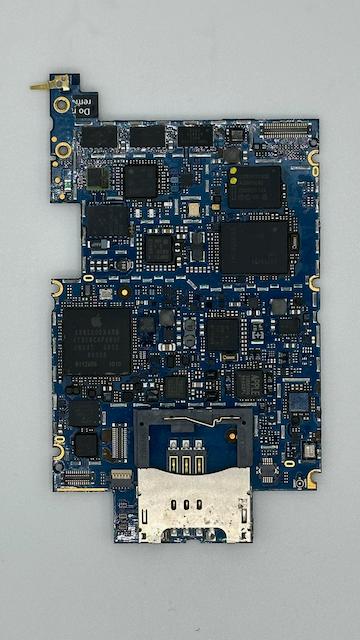
What better way to spend a cold and grey Sunday afternoon in December than sorting through your spare parts bin and deciding to teardown an iPhone 3G. Don’t worry, this iPhone 3G was broken long before it came my way.
iPhone 3G (A1241) is the second iPhone to have been released. It started shipping to customers on July 11, 2008. The US model was only available on the AT&T Wireless network. 2008’s color options where Black and White. The Black model was available in 8GB or 16GB configurations, while the White iPhone 3G was only available in the 16GB configuration.
Powering the iPhone 3G is the Samsung ARM-based System on a Chip (SoC) that contains the 412MHz CPU and 128MB LPDDR memory. In the photo, above, the SoC is the large chip on the left with the Apple logo printed on it.
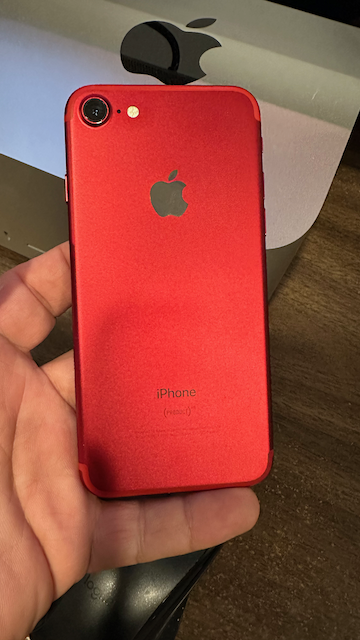
I have been looking for a reasonably priced used (PRODUCT)Red iPhone for a while now. First introduced as part of 2016 iPhone product line, the (PRODUCT)Red iPhones, in my opinion, have a strikingly bold color that makes them standout against the other colors in the line up.
Being a nerd who has to have all of the latest iPhone features, I gravitate toward the Pro model iPhones. Apparently, Pro iPhones are not allowed to have cool color choices, so I had never purchased a (PRODUCT)Red iPhone as my daily device.
About three weeks ago, I purchased a batch of broken iPhones from seller from eBay. All the iPhones were listed “as-is” and not tested. This is eBay code for broken and/or iCloud Locked. One device, for example, a GSM iPhone 6, was in great condition, but was iCloud Locked.
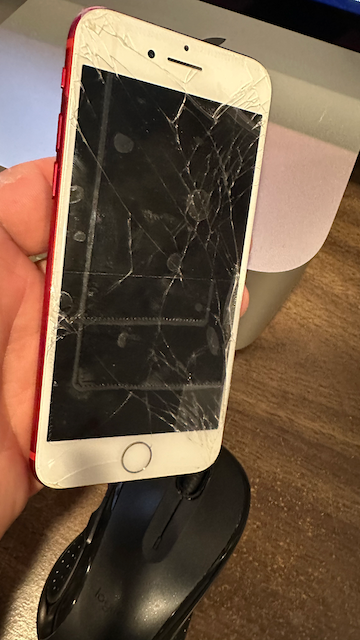
One device in the listing caught my eye: a (PRODUCT)Red iPhone. No mention was made of which model it was. All I could tell from the photos was that it had a shattered display.
Broken iPhone 7 screen with packing tape
Once the shipment arrived, I zeroed in on the (PRODUCT)Red iPhone. It had a 4-digit PIN code. I tried entering my picks from a list of commonly used PIN codes. Eventually, I reached the limit for failed PIN code attempts, and the iPhone disabled itself.
To my surprise, the previous owner had not enabled the Find My iPhone feature. Without the Find My iPhone security feature enabled, the DFU mode iOS 15 install had the effect of erasing the previous owner’s data and reset the iPhone so I could make it my own. To test this out, I logged into iCloud with a test Apple ID and sure enough, I was able to login and assert ownership of the iPhone.
The final step, now that I was certain that the iPhone 7 wasn’t iCloud locked, was to setup a Genius Bar appointment at my local Apple Store and have the screen repaired. Thankfully, the iPhone 7 and iPhone 7 Plus models still have a “Supported” status, meaning that Apple will still service them.
I explained to the Genius who was helping me that I was the second-hand owner of the iPhone and wanted to have the screen repaired. I mentioned that I hadn’t opened the iPhone but couldn’t definitively state that someone else may have gone inside. The Genius ran the iPhone through a suite of diagnostic tests to confirm that there was nothing else wrong with the iPhone.
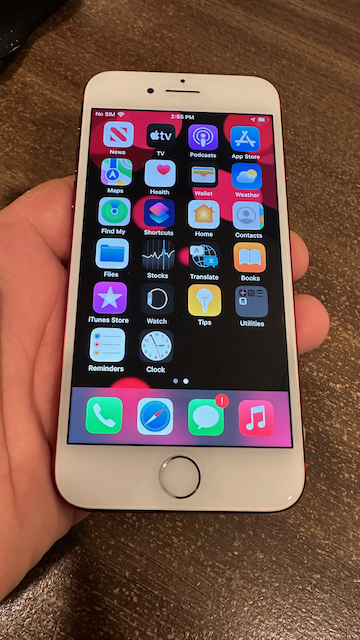
iPhone 7 with a new screen
After confirming that no other defects were present, I handed the iPhone over to be serviced. It would be ready later that day. A few hours later, I picked up the repaired (PRODUCT)Red iPhone and brought it home.
Thankfully, even when you consider the repair cost of the new screen, I was able to find a relatively inexpensive (PRODUCT)Red iPhone 7. This was not the way I was expecting this story to turn out. I was expecting the iPhone to be iCloud locked, indicating that the iPhone was possibly stolen. If you plan on buying a used iPhone from eBay, be sure that the seller shows pictures of the unlocked home screen and the Settings app showing that the iCloud account is logged out. Logging out of iCloud on an iPhone will disable the Find My iPhone security feature.
In this particular case, this repair story has a positive ending, allowing me to welcome home a (PRODUCT)Red iPhone 7!